FPVRush
FeaturesTelemetryDevicesLinkDownload
Get App
FeaturesTelemetryDevicesLinkDownload

FPVRush Link

Flash the controller before it goes on the car.

Pick a supported board, verify the published firmware, then install it from the browser or download the UF2 for drag-and-drop flashing.

Current releaseLoading
Loading the firmware manifest.

Board

Pick your hardware

Select the board you want to flash, then use the installer below.

Microcontroller family

Board

Selected board

Raspberry Pi Pico

Drag-and-drop UF2 install. Hold BOOTSEL while plugging in to mount as a USB drive.

UF2

Install

Download UF2 firmware

Firmware for this board is not present in the published manifest yet.
File
-
Size
Not published
SHA-256
-

Wiring

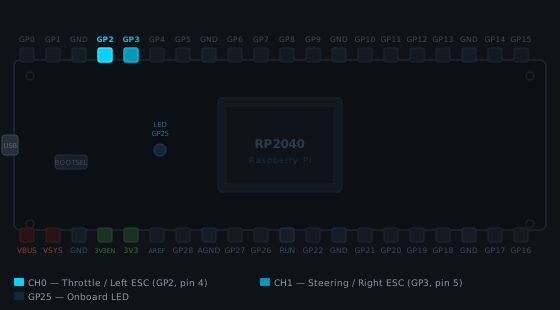
Raspberry Pi Pico pinout diagram
  • GP2 (pin 4)CH0 - Throttle / Left ESCThrottle ESC signal wire (white/yellow)
  • GP3 (pin 5)CH1 - Steering / Right ESCSteering ESC signal wire (white/yellow)
  • GP25Onboard LED(built-in - no wiring needed)
Full board pinout

Boot mode

Before install

  1. Hold the BOOTSEL button.
  2. Plug in the Pico over USB while still holding BOOTSEL.
  3. A drive named RPI-RP2 should appear. Drop the downloaded UF2 onto it.
  • ESC signal ground (black/brown wire on the servo connector) -> any GND pad on the board.
  • ESCs power themselves from their own battery - do not connect the ESC's red wire to the board's 5 V.
  • USB-C goes to the phone over an OTG cable. The phone provides 5 V to the board over the same cable.
FPVRush
© 2026 FPVRush. All rights reserved.Made in Portugal · GDPR Compliant